Same-prompt test
Seedream 5.5 vs 5.0 Pro: which jobs to switch, and which to leave alone
Short answer
Switch most work. On the same prompts Seedream 5.5 rendered multilingual text that 5.0 Pro garbled and held a scene through six edits where 5.0 Pro redrew the person, while costing less and finishing sooner. Stay on 5.0 Pro if you need a shape 5.5 dropped, such as 4:5, or if your edits depend on automatic aspect ratio.
- 22/22 vs 7/22 multilingual lines correct
- 1.5% vs 26.9% face change after six edits
- $0.027 vs $0.072 per 2K image
Which jobs to move
| Your job | Use | Why |
|---|---|---|
| Signs, labels or posters in several scripts | 5.5 | 22 of 22 lines correct against 7 of 22. 5.0 Pro broke Arabic, Thai, Hindi, Greek and Russian in both runs. |
| Revising one image again and again | 5.5 | After six edits the untouched areas barely moved. On 5.0 Pro the person shifted and the face was redrawn. |
| High-volume drafts | 5.5 | $19.50 per 1,000 images at 1K against $36, and $27 at 2K against $72. |
| 4K delivery | 5.5 | 5.0 Pro stops at 2K. |
| Latin and short Japanese or Korean copy | Either | Both got all 11 lines right in both runs. 5.0 Pro kept the layout straighter. |
| Portraits | Either | We saw no clear winner, in our runs or in the blind test. |
| 4:5 feed images, 2:1 banners, 3:1 strips | 5.0 Pro | 5.5 rejects these shapes. |
| Batch edits on mixed source shapes | 5.0 Pro | It can follow the source shape automatically. 5.5 cannot. |
We ran every prompt on both models on 7 November 2026, through SpicyAPI, at the same resolution and in PNG. Each prompt ran twice per model, and we scored text by reading every line. The whole test cost $1.01. Two runs is enough to show a large gap, not to measure a small one, so treat the “Either” rows as “no difference we could see”.
Text: the gap appears when the script gets harder
We asked both models for a hotel safety notice: a title, nine language lines and a tiny footer. Seedream 5.5 got all 11 lines right in both runs. Seedream 5.0 Pro got three right in one run and four in the other. It kept the title, the English line and the footer, then fell apart on anything less common.
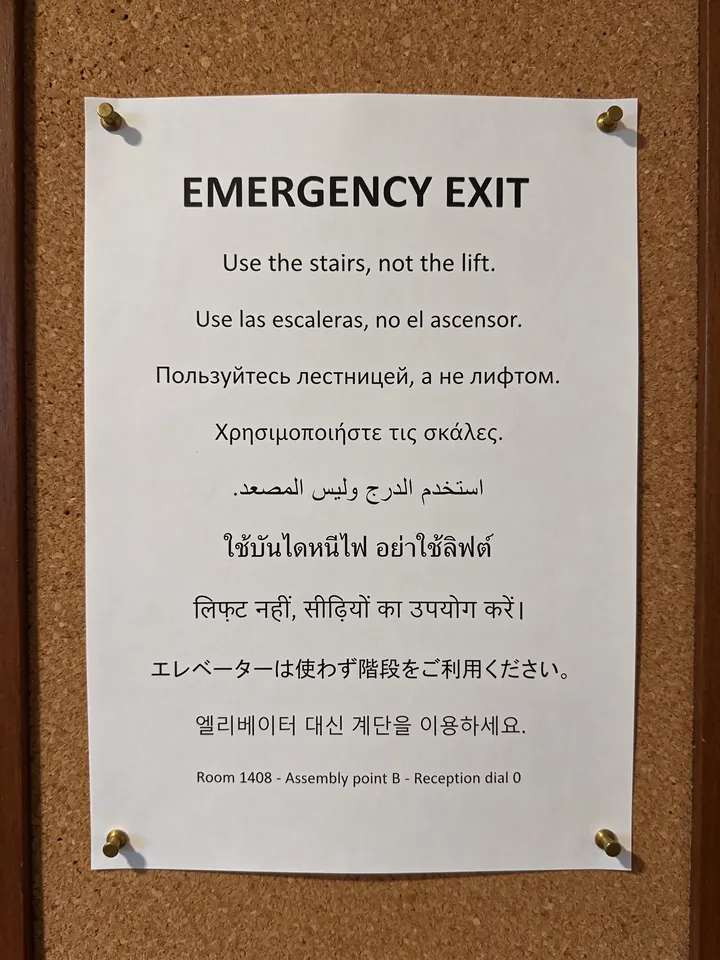
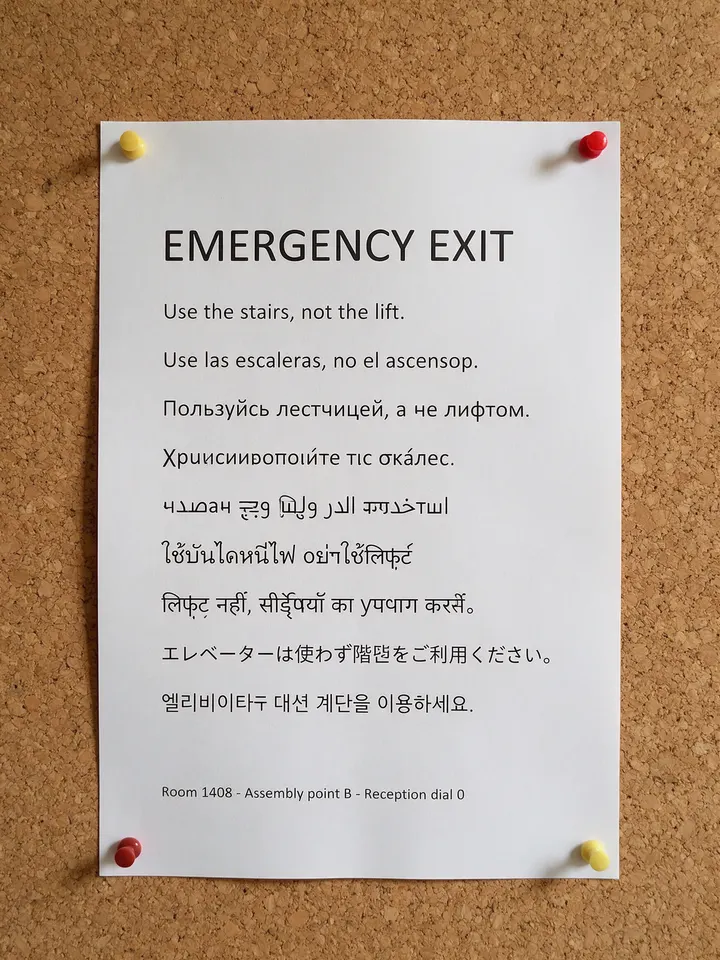
The errors are easy to miss if you cannot read the language. Both 5.0 Pro runs also slipped on Korean and Japanese while looking tidy at a glance. If your output carries languages nobody on the team reads, this result alone justifies moving.
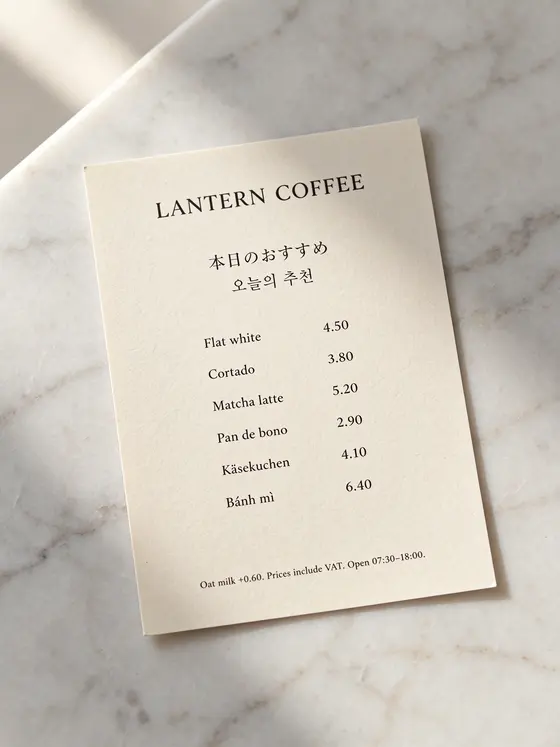
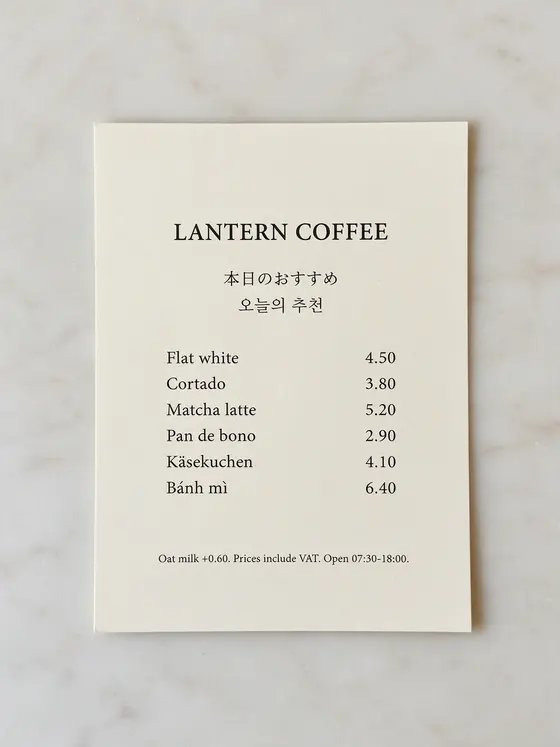
Easier copy is a different story. On a café price card with English, Japanese, Korean and accented Latin text, both models got all 11 lines right in both runs. Here 5.0 Pro had the edge on layout: it kept the card square to the camera, while 5.5 tilted it in both runs.
Repeated edits: 5.5 leaves the rest of the picture alone
ByteDance says 5.5 stays stable over more than 100 editing rounds. We tried six. Starting from one photo made by a third model, so neither side was editing its own work, each model made the same six small changes in sequence: mug, sweater, poster, pen, book, phone. Every instruction ended by asking to keep everything else the same.



To put a number on it, we compared areas no instruction touched with the starting image, after all six rounds. A figure near zero means those pixels did not change.
| Untouched area | Seedream 5.5 | Seedream 5.0 Pro |
|---|---|---|
| Her face | 1.5% | 26.9% |
| Window and fern | 0.9% | 7.1% |
| Wall clock | 0.5% | 6.1% |
| Bare wall | 0.5% | 7.4% |
The damage on 5.0 Pro built up: small at first, then a jump at round four, when the person moved. That is the pattern to watch for, since a single edit can look fine and still start the slide. If you must stay on 5.0 Pro, edit from the original each time rather than from the last result. This is one chain per model at 1K, so it shows a clear difference on this image, not a rate.
Portraits: pick by framing, not by version
We asked for a carpenter at work, with both hands on a chisel. Neither model produced obviously broken hands in four runs. Seedream 5.5 stepped back and showed more of the workshop, while 5.0 Pro went closer, with harder light and more texture in the skin. Neither looks like a generation ahead of the other.


The blind test agrees. On the same 14 prompts, AI judges from three companies gave 5.5 a score of 76.8 and 5.0 Pro 76.3, too close to separate. The 78.8 you may see for 5.0 Pro comes from a larger prompt set, so do not compare it with 76.8 directly. If image quality is your only reason to move, you do not have one yet.
Transparent output: a clean outline, but solid glass
Seedream 5.5 can return a transparent PNG straight from a prompt, which saves a background-removal step that 5.0 Pro still needs. There is a catch for product work. We asked for a glass bottle and checked the alpha channel: the outline is cut cleanly, but the glass itself is 100% opaque, so a background placed behind it will not show through.
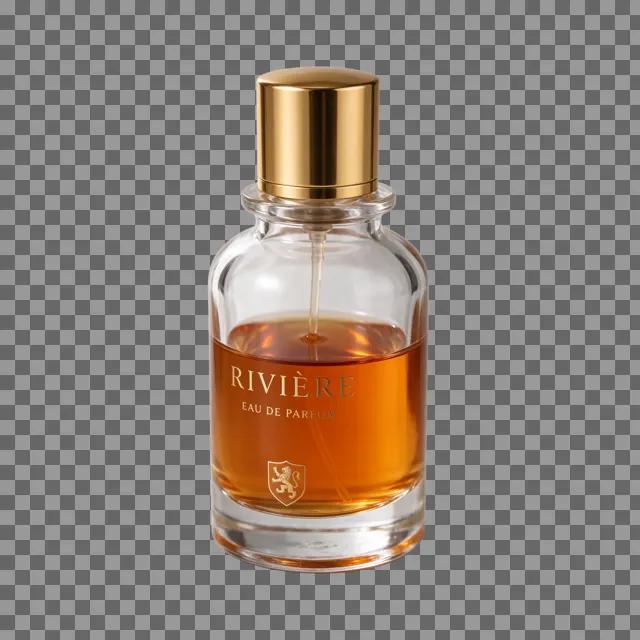
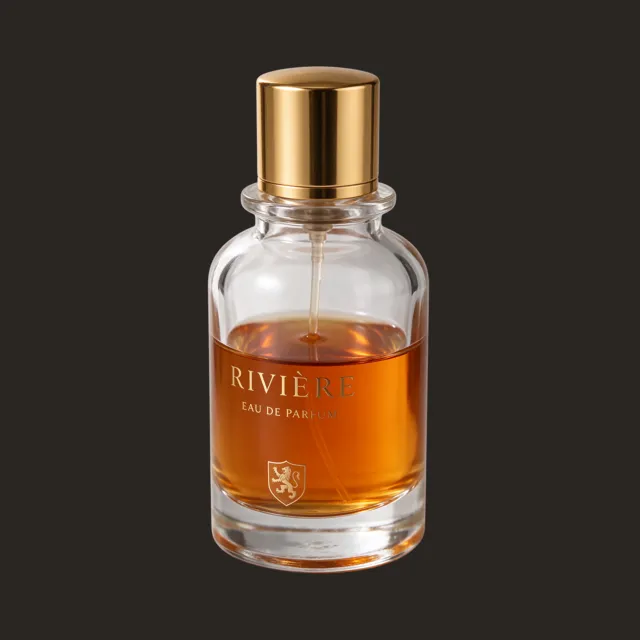
That is fine for solid products. For glass, liquids or smoke, plan on compositing by hand.
When to stay on 5.0 Pro
- You publish in shapes 5.5 dropped. 4:5, 5:4, 9:21, 2:1, 1:2, 3:1 and 1:3 are gone, and 4:5 is the usual tall feed format. Cropping from 3:4 works for one image but changes your composition rules across a batch.
- Your pipeline edits mixed source shapes. 5.0 Pro can follow the source with an automatic ratio. 5.5 has no such setting and defaults to square, so you would have to read each source and map it to one of eight ratios, and any shape outside those eight gets reframed.
- You have a look you trust. If a project is tuned to 5.0 Pro, the framing changes shown above will move your results, so re-test before you switch a live job.
If you do switch an existing integration, changing the model ID is not quite enough. These are the differences to plan for. We confirmed the three rejections against the live API:
| In your 5.0 Pro request | On 5.5 | What to do |
|---|---|---|
| A dropped aspect ratio | Rejected with an error | Map it to one of the eight ratios, or keep that job on 5.0 Pro |
| Automatic ratio on an edit | Rejected with an error | Send the ratio that matches the source |
| No ratio on an edit | Output comes back square | Always send a ratio |
| The thinking setting | Rejected with an error | Remove the field |
| No format set | PNG instead of JPEG | Set JPEG if file size or storage matters |
What you would pay and wait
| Job | Seedream 5.5 | Seedream 5.0 Pro |
|---|---|---|
| 1K image | $0.0195 | $0.036 |
| 2K image | $0.027 | $0.072 |
| 4K image | $0.0525 | Not offered |
| 1K edit, one source image | $0.027 | $0.036 |
| 2K edit, one source image | $0.0345 | $0.072 |
| Time per image in our runs | 26 to 59 seconds, median 33 | 44 to 145 seconds, median 55 |
| Time per edit in our runs | 22 to 38 seconds | 38 to 116 seconds |
Prices are SpicyAPI quotes from 7 November 2026, and refused or failed runs are not charged. Times include the queue and come from one evening, so read them as “5.5 was usually quicker”, not as a guarantee. The largest saving is at 2K, the default size on both models, where an image costs 62% less and an edit 52% less.
Layer splits are the one job where the budget works differently. 5.5 lets you cap the output, so a split limited to six images was quoted at $0.117 at 1K. 5.0 Pro has no cap and held $0.714 on the same image. We compared quotes only and did not run this one.
If NSFW range is part of your decision
It should not change the answer. Neither model refused a run, and they deliver at a similar rate: 52 of 54 on 5.5 and 37 of 38 on 5.0 Pro. The level-by-level results are in the Seedream 5.5 test on SpicyAPI, and every other version is in our Seedream family note.
Questions
Will my Seedream 5.0 Pro prompts work on 5.5?
The wording will, and every prompt here ran unchanged on both. The results will differ in framing, so re-check anything tuned to a specific look. Some request settings need changing first; the table above lists them.
Does Seedream 5.5 have a seed or a negative prompt?
No, and neither does 5.0 Pro on SpicyAPI, so you cannot reproduce an exact image on either model. Expect each run of the same prompt to come out differently.
Should I switch from Seedream 5.0 Lite or Flash instead?
We did not run those two in this test. At 1K, 5.5 costs less per image than either, but check your own prompts before moving.