
Two finished avatar clips, two different outcomes
Both P-Video 2 Pro avatar jobs finished with a playable picture and an audio track. In the 480p take, the requested change appeared and the location changed with it. In the 768p take, the original styling survived and the requested change was softened. A log of completed jobs gives these two takes the same mark.

Both files passed a technical check
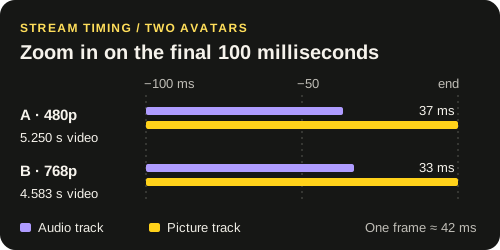
On 2 November 2026 the 480p run used about 5.21 seconds of speech. Its output contained 126 video frames at 24 fps. The 768p run used about 4.55 seconds of speech and returned 110 frames at the same rate. We measured the encoded audio and picture separately. Their end times in both files are within one frame of each other.
Only the picture revealed which edits survived
| Take | NSFW direction | Continuity note |
|---|---|---|
| A · 480p832 × 480 | Requested change appeared. | The scene moved away from the source setting. |
| B · 768p1344 × 768 | Requested change softened. | The original styling remained visible. |
For a standalone character clip, take A may be usable. Cut it into a sequence that has already established the location and that same change becomes a continuity error. Replaying or remuxing take B will still show the original styling. Change the generation setup if that visual detail is essential to the shot.
Decide what must survive before the next run
On the review sheet, write one thing the avatar should change and one thing it must preserve. Watch once muted for those two details. Then play the spoken line with sound and inspect the first accented word and the end of the phrase. Keep separate entries for timing, the requested change and continuity, even if the take gets a single overall decision.
These runs changed the resolution and the audio length, and the second used prompt expansion. Neither file isolates the effect of expansion or resolution. To test expansion, keep the same reference, recording, size and brief across several pairs, then compare the original outputs with the setting on and off.