
How long is an NSFW video take?
A four-second slot on a 24 fps timeline takes 96 frames. MiniMax H3 HighSpeed gave us 90, whether we started with text, an opening still or a reference image. P-Video 2 Pro gave us four frames to spare on a five-second text request and fourteen on a six-second image request. All five NSFW takes met the Strong (L3) brief in the original review.
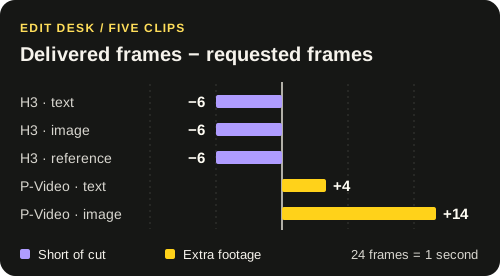
The six-frame gap is in the running time
We decoded the presentation timestamps as well as reading the file headers. The first H3 picture starts at zero and the last starts at 3.708 seconds. It stays on screen for another 1/24 second, bringing the take to 3.750. All 89 intervals are evenly spaced. There is no timestamp gap in the middle to locate or repair. The file alone cannot tell us why generation stopped at frame 90.
| Model and input | Requested | Frames | Playback |
|---|---|---|---|
| MiniMax H3 HighSpeedText · 1344 × 768 | 4 s | 90 | 3.750 s |
| MiniMax H3 HighSpeedImage · 1344 × 768 | 4 s | 90 | 3.750 s |
| MiniMax H3 HighSpeedReference · 768 × 1344 | 4 s | 90 | 3.750 s |
| P-Video 2 ProText · 704 × 480 | 5 s | 124 | 5.167 s |
| P-Video 2 ProImage · 1344 × 768 | 6 s | 158 | 6.583 s |
Download the five measurements (CSV)
Where to put the cut
Going into a locked four-second shot, play the final half-second of the HighSpeed take against the soundtrack. A still ending might take a six-frame hold. A face mid-sentence or a hand still moving makes that hold visible. In that case move the cut earlier or allow a longer take in the shooting plan.
The P-Video image clip gives you the opposite decision. There are 158 frames for a 144-frame slot. If the opening image has to match the preceding shot, keep the head and choose an out-point. If the last pose matters more, mark that frame first and count back 144. The measured surplus is 0.583 seconds. How much of it you can use depends on where the action lands.
Testing an opening image of your own
The image rows are the closest pair here. Both used the 768p setting. H3 was asked for four seconds. P-Video was asked for six in speed mode with prompt rewriting. One run per configuration cannot establish which model is faster or more likely to keep a new brief. For a production decision, try the same cleared starting frame, target duration and edit point in both workspaces. Record the first take as well as any retry.
To repeat the file check, open the video review kit. The frame counts describe timing. The NSFW verdicts came from viewing the takes in the original review.